this post was submitted on 22 Feb 2024
0 points (NaN% liked)

Selfhosted

53539 readers
635 users here now

A place to share alternatives to popular online services that can be self-hosted without giving up privacy or locking you into a service you don't control.

Rules:

  1. Be civil: we're here to support and learn from one another. Insults won't be tolerated. Flame wars are frowned upon.

  2. No spam posting.

  3. Posts have to be centered around self-hosting. There are other communities for discussing hardware or home computing. If it's not obvious why your post topic revolves around selfhosting, please include details to make it clear.

  4. Don't duplicate the full text of your blog or github here. Just post the link for folks to click.

  5. Submission headline should match the article title (don’t cherry-pick information from the title to fit your agenda).

  6. No trolling.

  7. No low-effort posts. This is subjective and will largely be determined by the community member reports.

Resources:

Any issues on the community? Report it using the report flag.

Questions? DM the mods!

founded 2 years ago
MODERATORS
 

Edit2: Thanks all for your responses! I have checked the logs, https://lemmy.nz/comment/6192604, and based on that removed tracker-miner-fs as it's a search/index tool which I don't need. No idea why it took over all memory. I'll also get a WiFi Smartplug as a kill switch. Hopefully that solves it. Thanks again heaps!


I've got a HP ProDesk G3 which I'm using as home server, I've installed Ubuntu on it. Earlier this week the services I host on it stopped (Immich & Frigate). I tried to SSH, but it just hung after asking for a password. I could ping it, but it was just unresponsive.

I had to force reboot it manually. This is fine, but I'm not always at home.

The chip has Intel vPro as far as I know, which could be an option, but I have no idea how this works. The documentation on the Intel site seems focused on enterprises. I tried to connect with RealVNC which does not work, so I think I've got to install/configure something on the server first.

I also asked Bing Chat but it came up with non existing packages & commands. Welcome your thoughts!

/edit: I just found this, which seems to be exactly what I need: https://manpages.ubuntu.com/manpages/focal/en/man7/amt-howto.7.html

top 2 comments
sorted by: hot top controversial new old
[–] Decronym@lemmy.decronym.xyz 1 points 2 years ago* (last edited 2 years ago)

Acronyms, initialisms, abbreviations, contractions, and other phrases which expand to something larger, that I've seen in this thread:

Fewer Letters More Letters
HA Home Assistant automation software
~ High Availability
IP Internet Protocol
NAS Network-Attached Storage
RPi Raspberry Pi brand of SBC
SBC Single-Board Computer
SSH Secure Shell for remote terminal access
VNC Virtual Network Computing for remote desktop access

5 acronyms in this thread; the most compressed thread commented on today has 5 acronyms.

[Thread #533 for this sub, first seen 22nd Feb 2024, 04:35] [FAQ] [Full list] [Contact] [Source code]
[–] nightrunner@lemmy.world 1 points 2 years ago* (last edited 2 years ago)

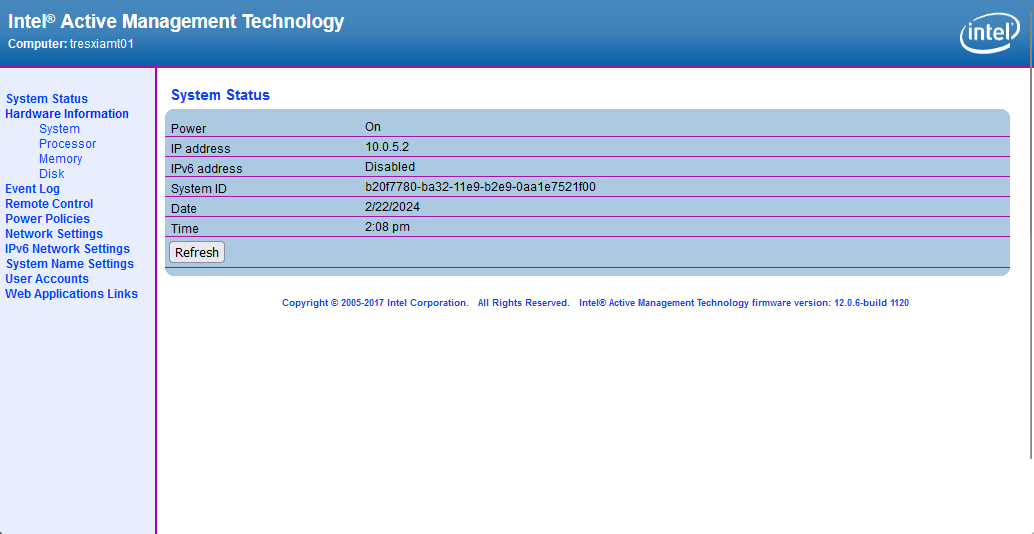
Ok, I grabbed a few screen shots for you as well. Here is a site that will link you to MEBx setup that enables AMT: http://h10032.www1.hp.com/ctg/Manual/c03883429

When power on your ProDesk G3, you can access the MEBx setup by pressing Ctrl+P or they also say F6 or Escape will get you there. Intel AMT runs on a different IP address than what your OS gets. You can assign DHCP or a static IP address and setup your admin password. You can then access the portal from http://ipaddress:16992/ There should be a method of access what would show on the screen through a KVM like access but I use MeshCentral for that so I couldn't tell you how to do it without.

Hopefully, that gives you a start. Feel free to reach back out if you have any questions. Thank you!