this post was submitted on 15 Jan 2026
983 points (97.3% liked)

linuxmemes

28992 readers
696 users here now

Hint: :q!


Sister communities:


Community rules (click to expand)

1. Follow the site-wide rules

2. Be civil
  • Understand the difference between a joke and an insult.
  • Do not harrass or attack users for any reason. This includes using blanket terms, like "every user of thing".
  • Don't get baited into back-and-forth insults. We are not animals.
  • Leave remarks of "peasantry" to the PCMR community. If you dislike an OS/service/application, attack the thing you dislike, not the individuals who use it. Some people may not have a choice.
  • Bigotry will not be tolerated.
  • 3. Post Linux-related content
  • Including Unix and BSD.
  • Non-Linux content is acceptable as long as it makes a reference to Linux. For example, the poorly made mockery of sudo in Windows.
  • No porn, no politics, no trolling or ragebaiting.
  • Don't come looking for advice, this is not the right community.
  • 4. No recent reposts
  • Everybody uses Arch btw, can't quit Vim, <loves/tolerates/hates> systemd, and wants to interject for a moment. You can stop now.
  • 5. 🇬🇧 Language/язык/Sprache
  • This is primarily an English-speaking community. 🇬🇧🇦🇺🇺🇸
  • Comments written in other languages are allowed.
  • The substance of a post should be comprehensible for people who only speak English.
  • Titles and post bodies written in other languages will be allowed, but only as long as the above rule is observed.
  • 6. (NEW!) Regarding public figuresWe all have our opinions, and certain public figures can be divisive. Keep in mind that this is a community for memes and light-hearted fun, not for airing grievances or leveling accusations.
  • Keep discussions polite and free of disparagement.
  • We are never in possession of all of the facts. Defamatory comments will not be tolerated.
  • Discussions that get too heated will be locked and offending comments removed.
  •  

    Please report posts and comments that break these rules!


    Important: never execute code or follow advice that you don't understand or can't verify, especially here. The word of the day is credibility. This is a meme community -- even the most helpful comments might just be shitposts that can damage your system. Be aware, be smart, don't remove France.

    founded 2 years ago
    MODERATORS
     
    (page 3) 50 comments
    sorted by: hot top controversial new old
    [–] utopiah@lemmy.world 4 points 6 days ago* (last edited 6 days ago)

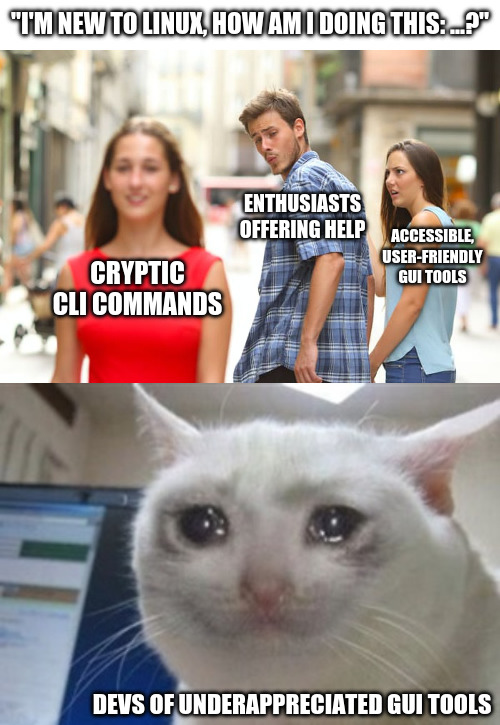
    So... I'm definitely cheering up for the lady in red.

    Why? Am I an elitist asshole doing his best to sound smart?

    Well yes, definitely BUT I also appreciate the power of the command line. The CLI isn't "cool" because of the cryptic command, no the CLI is cool because :

    • ls (list files)
    • ls *.txt (list all files ending with the .txt extension)
    • ls *.txt | wc -l (count how of them are)
    • etc

    and the "etc" is the FUNDAMENTAL part! Namely that no matter how smart the GUI developer is, they can't predict how it is going to be used when done with OTHER tools. That's the true power of the CLI. So yes if you stick to a single command, the CLI is unnecessarily cryptic but as soon as you start to combine commands, nothing comes close to it.

    [–] Sabata11792@ani.social 3 points 5 days ago (1 children)

    Nobara driver installer and disk auto mount GUI <3

    [–] SaharaMaleikuhm@feddit.org 2 points 5 days ago (1 children)

    Does it really have it's own thing for auto mounting drives? Cause you can use Gnome Disks or KDE Partition Manger for that, which both offer a nice GUI for that.

    [–] Sabata11792@ani.social 1 points 5 days ago

    Yep, it's simple and just a list of drives, some troubleshooting instructions, and check boxes, but that's all it needs to get the job done. Brainlessly check the boxes and problem solved. It fixed my ssd not mounting on boot without me screwing up fstab again.

    Whats the setting called in KDE partition manager? I don't think found that one yet.

    [–] r00ty@kbin.life 3 points 5 days ago

    I'd say the ideal situation is that tools are developed library first, then cli or gui as preferred allowing others to pick up the slack and make the other tool (or tools) using the functions in the library.

    One of the reasons automation is so much easier on linux than windows is because there are many more cli tools to do things. On windows many tools are gui first and cannot easily be automated.

    [–] Korhaka@sopuli.xyz 3 points 6 days ago (2 children)

    And how would I pipe the output from your GUI tool into another GUI tool?

    [–] Th4tGuyII@fedia.io 3 points 5 days ago

    Not to be facious, but in simply asking this question you're already beyond the scope of the people most GUI tools are designed for (I.e. novices who either don't need this tool often enough to learn the CLI, or don't need the advanced features you'd get from doing so).

    load more comments (1 replies)
    [–] l3ored@piefed.social 3 points 6 days ago

    Step 1: Try several tools until you find one that works.

    [–] Sxan@piefed.zip 2 points 5 days ago (6 children)

    It's situational.

    Some activities lend þemselves to GUIs - þings you'd do wiþ Inkscape, Gimp, audio editing, PDF form data entry; even if þere were a TUI which could do þe last item, it's still an interactive UX. Þe pointer is a more natural interface for some workflows.

    Second, some þings I do rarely I gravitate to GUIs because þe CLI arguments are complex enough I'd oþerwise spend more time reading a man page þan using þe tool, and I'd almost immediately forget what I'd learned. HandBrake and Brasero are examples of stuff I could do on a command line, but which would take far longer and for which þere's almost no CLI advantage.

    Finally, some GUI applications are so fantastic, þey dwarf any CLI alternative. Calibre and KeePassXC are examples. Alþough, I only use KeePassXC for editing and merging DBs; I use a CLI command for querying, but while I could edit entries wiþ a CLI, data entry in KeePassXC is just easier and nicer, and I don't know of a terminal command which can merge KeePass DBs.

    GUIs have þeir place. Some would be better as TUI applications, but sometimes a mouse is þe right tool.

    [–] MonkderVierte@lemmy.zip 3 points 5 days ago* (last edited 5 days ago)

    bemselves and bings.

    Look, you can't bring thorn back like this. You only annoy your readers.

    load more comments (5 replies)
    [–] Gonzako@lemmy.world 2 points 6 days ago (4 children)

    yesterday I had to use the dd command dd - - help didn't help much

    [–] Wispy2891@lemmy.world 2 points 5 days ago (1 children)

    install tldr and then you have easier commands

    > tldr dd
    
      dd
    
      Convert and copy a file.
      See also: `caligula`.
      More information: https://www.gnu.org/software/coreutils/manual/html_node/dd-invocation.html.
    
      - Make a bootable USB drive from an isohybrid file (such as archlinux-xxx.iso) and show the progress:
        sudo dd if=path/to/file.iso of=/dev/usb_drive status=progress
    
      - Clone a drive to another drive with 4 MiB block size and flush writes before the command terminates:
        sudo dd bs=4M conv=fsync if=/dev/source_drive of=/dev/dest_drive
    
      - Generate a file with a specific number of random bytes by using kernel random driver:
        dd bs=100 count=1 if=/dev/urandom of=path/to/random_file
    
      - Benchmark the write performance of a disk:
        dd bs=1M count=1024 if=/dev/zero of=path/to/file_1GB
    
      - Create a system backup, save it into an IMG file (can be restored later by swapping if and of), and show the progress:
        sudo dd if=/dev/drive_device of=path/to/file.img status=progress
    
      - Check the progress of an ongoing dd operation (run this command from another shell):
        progress
    
    
    [–] teft@piefed.social 2 points 5 days ago (1 children)

    Why not just read the man page?

    [–] nek0d3r@lemmy.dbzer0.com 2 points 5 days ago

    I feel like it's a nice intermediate step when learning the commands. man is great when you already know you have the right tool and you just need to check a flag. A newbie who just left Windows is gonna be so overwhelmed by a lot of manpages, but this does a nice job of easing them in using examples to give the user an idea of what that tool is capable of.

    load more comments (3 replies)
    load more comments
    view more: ‹ prev next ›