Since docker is in a VM on Windows, I'd take a full disk image of it before starting to migrate anything so you don't lose anything if you make a mistake. It also means that you can extract all your data from the disk image and migrate to the same distro but running on bare metal if you want.
this post was submitted on 29 Jul 2026
29 points (89.2% liked)
Selfhosted
61070 readers
1332 users here now
A place to share alternatives to popular online services that can be self-hosted without giving up privacy or locking you into a service you don't control.
Rules:
-
Be civil.
-
No spam.
-
Posts are to be related to self-hosting.
-
Don't duplicate the full text of your blog or readme if you're providing a link.
-
Submission headline should match the article title.
-
No trolling.
-
Promotion posts require active participation, with an account that is at least 30 days old. F/LOSS without a paywall has exceptions, with requirements. See the rules link for details. Tags [CBH] or [AIP] are required, see the links in Rule 8 for details.
-
AI-related discussions and AI-involved promotional posts have additional requirements for tagging, as noted in Rule 7 and the AI & Promotional Post Expanded Rules post, and find example disclosures here.
Resources:
- selfh.st Newsletter and index of selfhosted software and apps
- awesome-selfhosted software
- awesome-sysadmin resources
- Self-Hosted Podcast from Jupiter Broadcasting
Any issues on the community? Report it using the report flag.
Questions? DM the mods!
founded 3 years ago
MODERATORS
I'm looking for a tool that will clone my volumes and containers
???
Assuming you're using docker compose because not doing that when running 27 containers would be insane:
docker compose down- Copy all stuff over
docker compose up
rsync
Built-in, picks up where it left off if you accidentally cancel it by running the same command again, and dead simple.
Permissions for the files will probably be a little broken moving to Linux, but chmod is also easy to use and can work at the directory level.
Be wary when you use rsync, to not upgrade past version 3.4.1. Later versions were vibecoded / slopcoded and cause data loss.
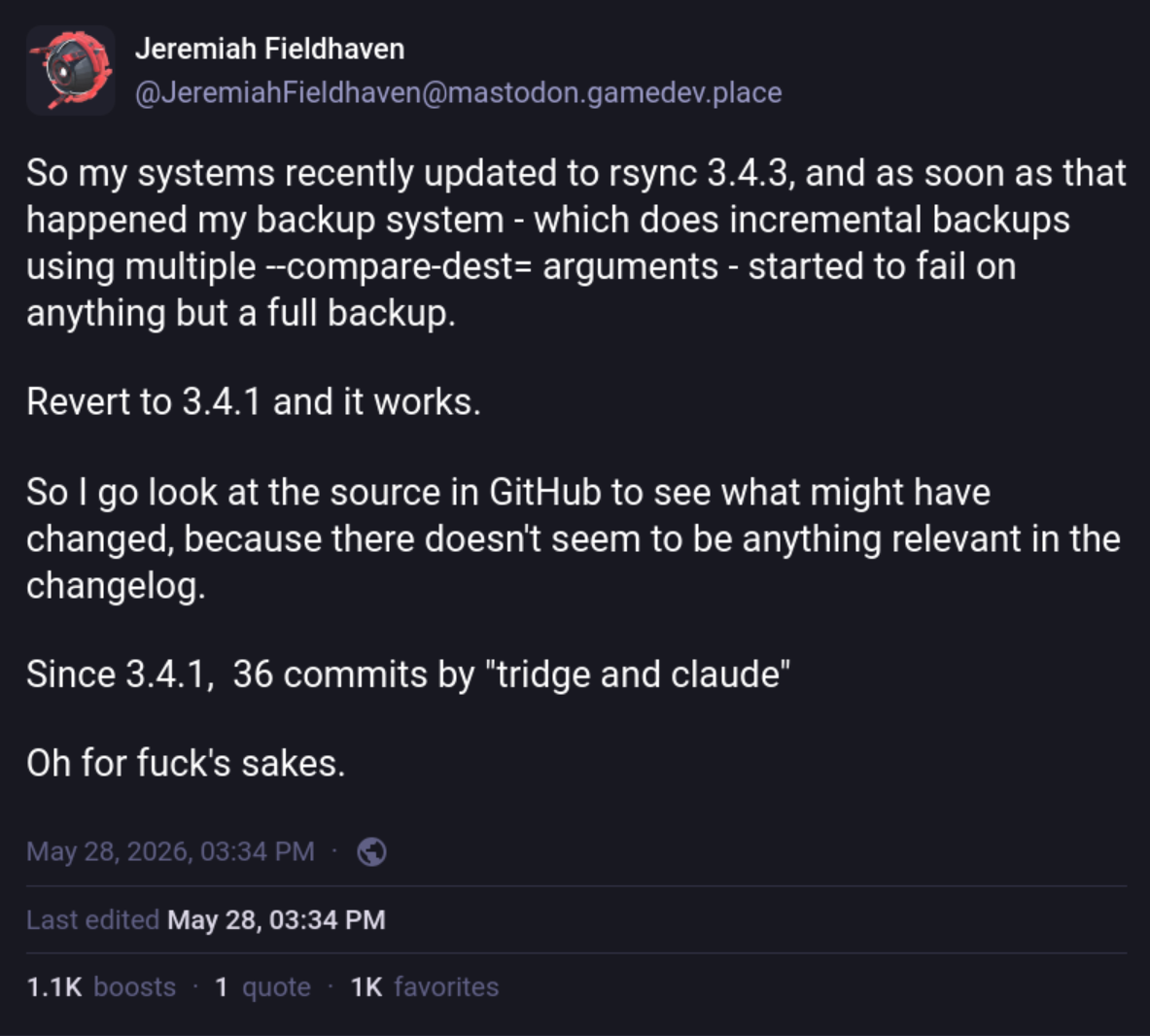
I too was upset with the use of Claude/AI/LLM's in the rsync project. The maintainer received a lot of public backlash and as a result people have offered their time to help the maintainer with this project.
Since the backlash, the use of agents has been drastically reduced. That seems like a very human and overall positive response. It sucks that it happened. It's nice that people are now doing the work again. The response could have been a lot worse. I can be forgiving in this specific situation.
Oh! I might check up how the repo is doing during the weekend, might merit an upgrade once the next major (3.5 if I'm getting my numbers right) comes around.
Fuck's sake. What was the actual bug introduced? I skimmed the issues on GitHub and nothing jumped out at me.
I don't remember the exact bug but just search for "data loss" and/or "changed behaviour", either it wil come up or the devs have been whitewashing their inclusion of AI and censoring discussions.
I don't see it, but I do see plenty of criticism of the use of claude.
I searched issues for "compare-dest", which seems to be the part they were complaining about being broken, and I didn't see any issues that looked relevant. I also looked through the commit log between 3.4.1 and 3.4.3 for anything mentioning that option and didn't see anything there either. So right now it just looks like fearmongering to me.
Dammit.
Don't sweat it (yet) and just lock it in your package manager. If you are on Debian, the last reasonable versions can be apt get from snapshots.debian.org and then just apt pin / apt mark hold those.
Debian has a policy of only cherry picking security updates, or critical bugfixes, in order to ensure maximum system stability. In general, they don't do entire program updates or additional features. For the 4 year lifecycle of a Debian release, it will behave the same as it did yesterday.
As of today, current version of rsync in Debian's stable's packages is 3.4.1: https://packages.debian.org/stable/rsync (archive).
The versions with significant LLM assistance are 3.4.3 and later.
Their comments on the bug tracker issue regarding staying on non-AI versions are however rather worrying, and they've ignored the issue completely, burying their heads in the sand.
This. Docker compose down, schlep the data over, update paths and permissions, docker compose up. Done.
Probably bring it up one step at a time so you can more easily identify anything you missed.
If you need to change the references in the compose or env files:
- use sed to replace text in .env
- use variables and interpolation in compose
Rancher Desktop?
K3d?
Or something else?
@horus_son_of_isis I can't tell you a tool for migrating. But for managing Docker / Podman container under linux, i really like #Dockhand . Many describe it as the better #Portainer (i havent used portainer, so i cant tell)
But I think for that you would need to adjust your current setup (as i understood one compose file "manages" other compose files) and split them up.
I would drop into the Docker VM and use scp to transfer all if your data