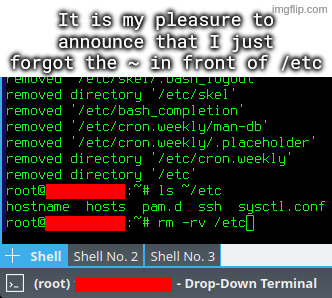
Reusing names of critical system directories in subdirectories in your home dir.

Hint: :q!
Sister communities:
Community rules (click to expand)
1. Follow the site-wide rules
sudo in Windows.Please report posts and comments that break these rules!
Important: never execute code or follow advice that you don't understand or can't verify, especially here. The word of the day is credibility. This is a meme community -- even the most helpful comments might just be shitposts that can damage your system. Be aware, be smart, don't remove France.
Reusing names of critical system directories in subdirectories in your home dir.

I agree with this take, don't wanna blame the victim but there's a lesson to be learned.
except if you read the accompanying text they already stated the issue by accidentally unpacking an archive to their user directory that was intended for the root directory. that's how they got an etc dir in their user directory in the first place
OOOOOOOOOOOF!!
One trick I use, because I'm SUPER paranoid about this, is to mv things I intend to delete to /tmp, or make /tmp/trash or something.
That way, I can move it back if I have a "WHAT HAVE I DONE!?" moment, or it just deletes itself upon reboot.
Just get a cli trash tool and alias it to rm. Arch wiki
That's certainly something you can do! I would personally follow the recommendation against aliasing rm though, either just using the trash tool's auto complete or a different alias altogether.
Reason being as someone mentioned below: You don't want to give yourself a false sense of security or complacency with such a dangerous command, especially if you use multiple systems.
I liken it to someone starting to handle weapons more carelessly because the one they have at home is "never loaded." Better safe than sorry.
Lol we should have "rules of rm safety":
I think this is the best approach. I've created a short alias for my trash tool and also aliased rm to do nothing except print a warning. This way you train yourself to avoid using it. And if I really need it for some reason I can just type \rm.
If you want to train yourself even more effectively you can also alias rm to run sl instead :)
you can also alias
rmto runslinstead :)
Choo-choo!!
Hehe I just thought of a hilariously nefarious prank: alias ls to sl. π
i always do "read;rm ./file" which gives me a second to confirm and also makes it so i don't accidentally execute it out of my bash history with control-r
Reminds me in the t-shirt: "don't drink and root"
Oof. I always type the whole path just because I have made this mistake before.
That doesn't protect you from typos.
rm -rv /home/schmuck /etc
"Whoops, I accidentally added a space."
I have three ways around this:
ls ~/etc ... <press up arrow, replace ls with rm -rv>ls ~/etc ... rm -rv !$I fucking hate using rm for these very reasons.
There's another program called "trash-cli" that gives you a trash command instead of going straight to deletion.
I'm not sure why more distros don't include it by default, or why more tutorials don't mention it.
it could be worse: rm -rv ~ /etc
Let he who has not wrongly deleted system critical files in Linux cast the first stone.
Amateurs. You all did it accidentally. I deleted system critical files intentionally believing it was beneficial.
βJust a little off the top pleaseβ
Great! Now you can enjoy that freshly assembled directory feeling, knowing that now you only have the configs in there that you need.
This is why you should setup daily snapshots of your system volumes.
Btrfs and ZFS exist for a reason.
Genuinely curious⦠why using root for operations like these?
To feel the thrill
So good to see that, even in 2026, Unix Haters' Handbook's part on rm is still valid. See page 59 of the pdf
Things like these are right of passage on Linux :)
Be happy that you didn't remeber the ~ and put a space between it and etcπ.
I am new to Linux and just getting somewhat comfortable as my daily driver, very proud of myself that I got the joke pretty quickly :)
Is there any reason to use a root account? If you had used sudo for each privilege needing command in stead it would have stopped you.
Is there any reason to use a root account?
if you just borked your /etc and need to rebuild because you don't have sudo anymore
Your first mistake was attempting to unarchive to / in the first place. Like WTF. Why would this EVER be a sane idea?
I don't know if it should be a bad thing. Inside the tar archive the configs were already organized into their respective dirctories, this way with --preserve-permissions --overwrite I could just quickly add the desired versions of configs.
Some examples of contents:
-rw-r--r-- root/root 2201 2026-02-18 08:08 etc/pam.d/sshd
-rw-r--r-- root/root 399 2026-02-17 23:22 etc/pam.d/sudo
-rw-r--r-- root/root 2208 2026-02-18 09:13 etc/sysctl.conf
drwx------ user/user 0 2026-02-17 23:28 home/user/.ssh/
-rw------- user/user 205 2026-02-17 23:29 home/user/.ssh/authorized_keys
drwxrwxr-x user/user 0 2026-02-18 16:30 home/user/.vnc/
-rw-rw-r-- user/user 85 2026-02-18 15:32 home/user/.vnc/tigervnc.conf
-rw-r--r-- root/root 3553 2026-02-18 08:04 etc/ssh/sshd_config
Keeps permissions, keeps ownership, puts things where they belong (or copies from where they were), and you end up with a single file that can be stored on whatever filesystem.
Whelp, time to restore the latest snapshot.
Reminds me of when I had a rogue ~ directory sitting in my own home directory (probably from a badly written script). Three seconds into rm -rf ~ and me wondering why it was taking so long to complete, I CTRL+C, reboot, and pray.
Alas, it was a reinstall for me that day (good excuse to distro hop, anyway). Really glad I don't mount my personal NAS folder in my home directory anymore, holy shit.
Bruh
Ahh, the rites of passage!
alias rm="rm -i"
alias rm=βecho noβ
Yeah, same thing like with unclosed bottles, cup too close to the table edge, etc.: Accidents that can hapen, will happen.
Better name them something else in your user dir.
And yes, painful experience.
π

Ohohoho man did you ever fuck up. I did that once too. I can't remember how I fixed it. I think I had to reinstall the whole OS