In KDE the more you shake the mouse the bigger the cursor gets till it takes up one whole screen
Welcome to Lemmy Shitpost. Here you can shitpost to your hearts content.
Anything and everything goes. Memes, Jokes, Vents and Banter. Though we still have to comply with lemmy.world instance rules. So behave!
1. Be Respectful
Refrain from using harmful language pertaining to a protected characteristic: e.g. race, gender, sexuality, disability or religion.
Refrain from being argumentative when responding or commenting to posts/replies. Personal attacks are not welcome here.
...
2. No Illegal Content
Content that violates the law. Any post/comment found to be in breach of common law will be removed and given to the authorities if required.
That means:
-No promoting violence/threats against any individuals
-No CSA content or Revenge Porn
-No sharing private/personal information (Doxxing)
...
3. No Spam
Posting the same post, no matter the intent is against the rules.
-If you have posted content, please refrain from re-posting said content within this community.
-Do not spam posts with intent to harass, annoy, bully, advertise, scam or harm this community.
-No posting Scams/Advertisements/Phishing Links/IP Grabbers
-No Bots, Bots will be banned from the community.
...
4. No Porn/Explicit
Content
-Do not post explicit content. Lemmy.World is not the instance for NSFW content.
-Do not post Gore or Shock Content.
...
5. No Enciting Harassment,
Brigading, Doxxing or Witch Hunts
-Do not Brigade other Communities
-No calls to action against other communities/users within Lemmy or outside of Lemmy.
-No Witch Hunts against users/communities.
-No content that harasses members within or outside of the community.
...
6. NSFW should be behind NSFW tags.
-Content that is NSFW should be behind NSFW tags.
-Content that might be distressing should be kept behind NSFW tags.
...
If you see content that is a breach of the rules, please flag and report the comment and a moderator will take action where they can.
Also check out:
Partnered Communities:
1.Memes
10.LinuxMemes (Linux themed memes)
Reach out to
All communities included on the sidebar are to be made in compliance with the instance rules. Striker
In KDE the more you shake the mouse the bigger the cursor gets till it takes up one whole screen
I learned recently it comes from MacOS (at least MacOS does it too)
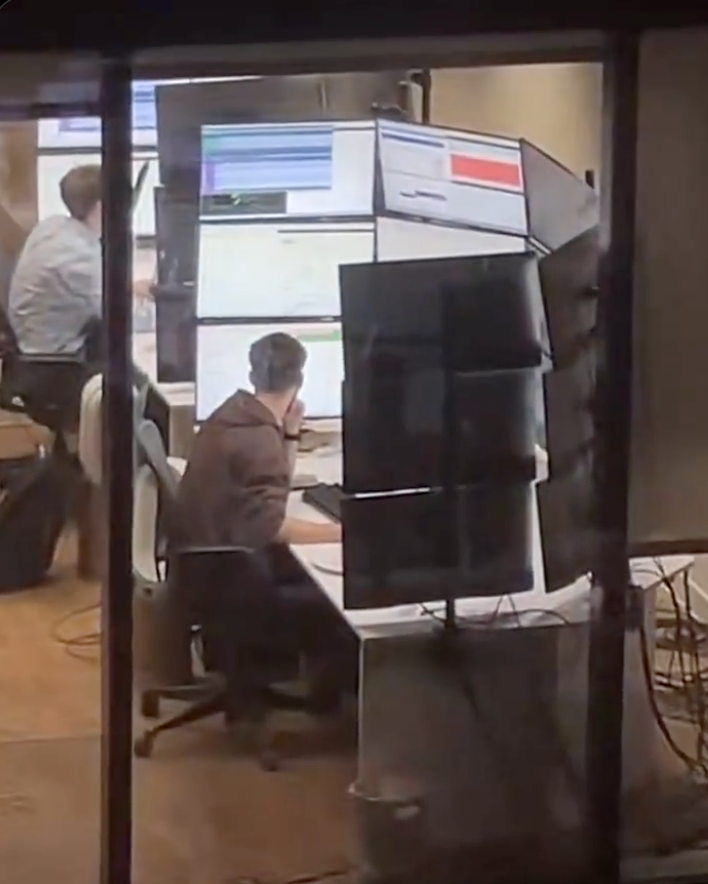
I work at a stock brokerage and I can confirm this is exactly the screen layouts these people have. By these people I'm talking about day traders I don't actually know what this person is doing.
And yes they do look across all of those screens. I sat next to a guy who had six screens arranged in 3x2, the way he explained it he has all sorts of programs mostly in the domains of communication and news and he doesn't even look at the other screens but when something moves it triggers his peripheral vision and he acts on it. Another day trader I know has nine screens in 3x3 but he only uses the bottom half of his screen real estate because he can't read the top, he just likes having a big rectangular-like screen.
It's all about peripheral vision to these kinds of professionals. They are 100% not looking at all of those screens, they just need to set up things to react to.
This guy is a meme though nobody is reacting to something happening right above your head.
On KDE Plasma when you shake the cursor it gets bigger, with no size limit.
On macOS it also does but there is a limit.
I don't know whether Windows does because I've never used it, but I'd assume so.
Neither do I know about other DEs.
I saw a bug report when KDE Plasma 6 was released that the cursor keeps growing indefinitely. A dev responded like "yeah I noticed that but decided it's actually a great feature"
For those interested, there is a gnome extension called Wiggly that does this a similar thing.
Used to be called Wiggle, but development and bug fixing seems to have stopped on that one.
I think you can enable something where you can press control and it will put a big circle around your cursor but it's not enabled by default which is stupid and it's not obvious because it's a random keyboard key.
It's a utility under PowerToys called Find My Mouse.
You can set it to either double pressing the left or right Control key, shake the cursor or a custom shortcut.
This has been a godsend for me...I have a pair of 35" ultrawides and I was constantly losing the mouse due to the fact that my desktop is 70" wide lmao
Windows doesn't. I lose my cursor all the time even though I made it neon green.
Doesn't Windows have the option to configure a hotkey to indicate cursor location? Maybe in the accessibility settings or something? It's been a while since I've used Windows.
Yeah double tap control
I've known people who have had the same issue and they not only turn it neon green but turn on mouse trails to an extreme degree. If you draw a little circle with your hand it's very easy to spot.
I'll have to give that a shot at work
I was about to say this same thing. It’s such a fantastic feature.
Sometime I get bored and wiggle the mouse untill it covers both screens. 10/10
This is it. This is the threshold of where a VR headset and a virtual desktop manager makes more sense.
I can't believe no one's posted this yet

As much as I'm an advocate for VR I don't think I'd want to spend 8 hours in a rig. I look like I've been wearing ski goggles as it is and that's only after two or three hours.
I refuse to believe that this setup is actually efficient. You cannot possibly actually need that much information on screen at the same time. I think Houston mission control has less going on than this.
This is just having a lot of screens for the sake of it.
keeps him warm ?
He uses them to work on his code and his tan.

This guys been waiting for his moment
Maybe that would be a better screen setup?

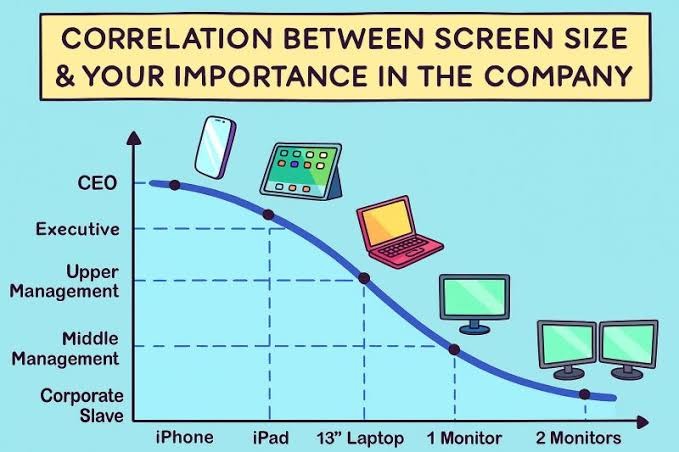 I guess we need to extend this chart somewhat...
Those executive ultrabook, touch screen super thin and lites are such shit. Fragile, usually run hot, sometimes the SSD is even soldered, and fuck you if you want to get parts or service.
Shake till it gets big
😐 What gets big exactly?
It's a feature in KDE that if you shake or move the mouse fast the cursor gets bigger so you can find it.
Debian 13 + KDE Plasma - Why does the mouse get so huge? HAAAAHAHAHAHA
My favorite part is that it keeps getting bigger as you continue shaking it, eventually resulting in a big-ass cursor that can't be contained in one display lol
...What? I was bored...
A least he's getting enough light. Maybe not the right wavelength though.
I was going to say his vitamin D intake is at least taken care of.
If I had that many screens I would at least put everything in dark mode.
I have had friends and coworkers send this meme to me repeatedly because my WFH setup is closer to this than I'd like to admit. Fuck it though, I find it helpful.
Bro, I have one coworker that does his work on a 14" laptop, no external mouse or keyboard.
I have no idea how. I have minimum 15 windows open at once and am going back and forth on them or have 4 windows open at once in my monitors to compare data and make markups. And ofc a nice keyboard and mouse. Laptop gets shoved out of sight.
I feel like he's either really slow or not doing any work at all.
And then I feel guilty because I don't work hard enough 🙄
Somone needs to make a program that greys out any monitor that the cursor isn't on.

