aclarke

joined 2 years ago
[–] aclarke@lemmy.world 7 points 3 weeks ago (1 children)

Oh I'm looking into this IMMEDIATELY! πŸ˜‚ That's awesome!! Does it also form a mesh?

[–] aclarke@lemmy.world 21 points 3 weeks ago

That's exactly the reason why I made it only work with user-defined aliases. That way it forces you to think of how to cover the most ground command-wise without needing anything interactive or too much response data. It's slow but it's functional and that's really all I wanted from it. I can have scripts on my server that fix things and just invoke them with this.

[–] aclarke@lemmy.world 14 points 3 weeks ago

They're encrypted with a PSK encrypted with either AES128 or AES256. It's built into the Meshtastic firmware so that's not something I have to handle directly, thankfully!

[–] aclarke@lemmy.world 10 points 3 weeks ago* (last edited 3 weeks ago) (1 children)

I started thinking about using the LoRa protocol directly for this too! My biggest concern is overwhelming the mesh. But I also had no idea what protocol would work so thanks for mentioning PPP. I haven't thought about that since I was a kid! That would be really cool though!

Maybe just for a POC someday?

Also: how are you liking MeshCore? Did you have to pay for a license to use it? How expensive is the mesh you're building? That is something I've started thinking about too for this exact reason πŸ˜‚

[–] aclarke@lemmy.world 2 points 3 weeks ago

Ah I see what you mean. Yep I totally misunderstood what you meant. Yes I did think about that but I wanted to be able to control my servers too, hence MeshExec. ☺️

[–] aclarke@lemmy.world 7 points 3 weeks ago

Thank you! ☺️

[–] aclarke@lemmy.world 4 points 3 weeks ago* (last edited 3 weeks ago) (2 children)

I could except it would need Internet access to subscribe or publish to an MQTT broker. I wanted remote control when both I don't have Internet access when I'm away from home, and my home itself has no Internet access.

For MQTT packets to be forwarded over the mesh, there needs to be at least one MQTT gateway connected to it that has Internet access.


So one thing I've done to help me find more things to self host or do is think like a prepper. Like...what if my ISP goes out? How can I remotely control my homelab or even trigger Home Assistant events if my ISP is out? I had no idea how to solve this until about 6 months ago when I discovered Meshtastic.

For anyone who doesn't know: Meshtastic is basically an open-source, public mesh-network. You just buy a cheap ESP32 device, flash it with Meshtastic (They have a SUPER easy web-flasher so you don't need to be super technical to do it), and connect to it via Bluetooth with your phone and you're good to go! Then you can send messages to other nodes around you and have fully off-grid communications!

Well, while Meshtastic supports MQTT, that does require at least one end of the connection to have internet access. I wanted a way to SSH into my servers and diagnose or fix things without needing to rely on my ISP at all. Or even trigger things in Home Assistant without having access to any ISP. So, that naturally gave way to the idea of MeshExec.

MeshExec is a little binary that attaches to your serially-connected Meshtastic node, and looks for messages in a specified private channel for aliases to execute. Then it will execute whatever commands you specify and automatically chunk them and send them back through the mesh in a staggered fashion. This chunking is done to both fit inside the max message size that Meshtastic supports, and so that the mesh is not overwhelmed with messages and drops them.

You define the aliases, the shell used to execute the commands, etc. So you can basically use it to do whatever you want over the mesh! I've set up a handful of aliases to do simple diagnostics on my homelab servers. Things like restarting docker containers, checking the top 3 processes consuming the most memory, etc.

I decided to use aliases because I figured direct shell access to a server is SUPER dangerous, especially if you accidentally attach the daemon to a public channel.

No idea if this will be useful to anyone else, but I made it as easy to use as possible if anyone does want to use it. Here's the link to the repo if anyone wants to give it a go.

I just wanted to share how I've managed to find a way to further reduce my reliance on big corporations and my love for open-source software!

If anyone decides to give this a try, I'd love to know your thoughts or answer any questions you have!


Managarr v0.7.0 has been released with Lidarr support!

What is Managarr?

Managarr is a terminal-based application for managing all your Servarr instances from one place. It provides a user-friendly interface to interact with your media libraries, making it easier to manage your downloads, monitor your artists and albums, and perform various actions directly from the terminal.

It sports two modes: a TUI mode (Text-based User Interface) and a CLI mode (Command Line Interface).

TUI mode gives you an interactive User Interface right inside your terminal window, allowing you to navigate through your Sonarr and Radarr libraries, view details about your series and movies, and perform actions like adding or removing items, all through keyboard shortcuts.

CLI mode lets you execute commands directly from the terminal to manage your Servarr instances without needing to open the TUI. This is great for quick tasks or for integrating with scripts and automation tools.

Screenshots

Try it out for yourself using the in-browser demo!

If you want to try it out for yourself without installing it first, you can use the Managarr demo-site: https://managarr-demo.alexjclarke.com/

What Lidarr operations are supported?

πŸ“š Library Management

  • Artist Library - Browse, search, filter, and sort your music collection
  • Add Artists βž• - Search for new artists and add them with full config options (quality profile, metadata profile, root folder, monitoring options)
  • Edit Artists ✏️ - Tweak artist settings including quality profiles, metadata profiles, tags, and monitoring status
  • Delete Artists πŸ—‘οΈ - Remove artists from your library with optional file deletion
  • Artist Details πŸ” - Get the full picture on any artist:
    • Overview, disambiguation, type, status, genres, and ratings
    • Album list with release dates, track counts, and download status
    • Artist history with detailed event info
    • Manual discography search with release selection and download

πŸ’Ώ Album & Track Management

  • Album Details - Drill into individual albums to see:
    • Track listing with audio info (codec, channels, bitrate, sample rate, bit depth)
    • Album history
    • Manual album search for grabbing specific releases
  • Track Details 🎼 - View individual track info and history
  • Delete Albums - Remove individual albums from your library

⬇️ Downloads & Queue

  • Downloads Tab - Keep an eye on active downloads and manage your queue
  • Blocklist 🚫 - View and manage blocked releases

πŸ“œ History

  • Full History Support - Browse, search, filter, and sort Lidarr event history
  • History Details - Dig into the details of any history event
  • Mark as Failed ❌ - Mark history items as failed

πŸ”Ž Indexers

  • Indexer Management - View, add, edit, and delete indexers
  • Indexer Settings βš™οΈ - Configure global indexer settings
  • Test Indexers πŸ§ͺ - Test individual or all indexers at once

πŸ“ Root Folders

  • Root Folder Management - Add and manage root folders for your music library

πŸ–₯️ System

  • System Status - View Lidarr system info and health checks
  • Tasks - View and trigger system tasks
  • Queued Events - Monitor queued system events
  • Logs πŸ“‹ - Browse system logs
  • Updates πŸ†™ - Check for and view available updates

⌨️ CLI Commands

Full Lidarr CLI support for all the things!

managarr lidarr list artists|albums|tracks|indexers|root-folders|tags|quality-profiles|...
managarr lidarr get artist|album|track|...
managarr lidarr add artist|root-folder|tag|...
managarr lidarr edit artist|indexer|indexer-settings|...
managarr lidarr delete artist|album|root-folder|tag|blocklist-item|...
managarr lidarr search artist|album|...
managarr lidarr refresh artist|downloads|...
managarr lidarr trigger-automatic-search artist|album
managarr lidarr manual-search artist|album

Managarr also supports Radarr and Sonarr!

If you're running the full *arr stack, Managarr has you covered - It supports Radar and Sonarr too, all from the same interface!

This is a passion project so I'd love to hear your feedback, feature requests, or any bug reports you find.


Managarr v0.6.0 has been released with some fun new features!

Managarr is a terminal-based application for managing all your Servarr instances from one place. It provides a user-friendly interface to interact with your media libraries, making it easier to manage your downloads, monitor your series and movies, and perform various actions directly from the terminal.

It sports two modes: a TUI mode (Text User Interface) and a CLI mode (Command Line Interface).

TUI mode gives you an interactive User Interface right inside your terminal window, allowing you to navigate through your Sonarr and Radarr libraries, view details about your series and movies, and perform actions like adding or removing items, all through keyboard shortcuts.

CLI mode lets you execute commands directly from the terminal to manage your Servarr instances without needing to open the TUI. This is great for quick tasks or for integrating with scripts and automation tools.

The biggest change: Managarr now has themes!

The UI has been completely overhauled to support themes! You can now customize the look and feel of Managarr to suit your preferences. Choose from a variety of themes to change the color scheme and overall aesthetic of the application.

Here's just a few examples:

Default

default

Dracula

dracula

Watermelon Dark

watermelon-dark

You can also customize the themes to your heart's content! Check out the themes documentation for more details on how to create and apply your own themes.

Features

  • Added support for alternative Vim-like navigation keybindings (hjkl movements) Discussion #34
  • Added support for terminal-like backspace operations (Ctrl-h instead of Backspace)
  • You can now specify the number of downloads to fetch from the CLI: managarr <sonarr/radarr> list downloads --count 1234
  • You can now toggle movie monitoring from the CLI without needing to use the edit subcommand: managarr radarr toggle-movie-monitoring --movie-id 1234 #43
  • You can also now toggle series monitoring from the CLI without needing to use the edit subcommand: managarr sonarr toggle-series-monitoring --series-id 1234 #43
  • You can now also toggle movie/series monitoring directly from the Library view for each Servarr with the m key. No need to open the Edit [Series/Movie] modal anymore to simply toggle monitoring for an item! #43
  • Users can now skip up/down tables 20 items at a time using Ctrl-d and Ctrl-u keys (mirroring the same functionality in the Helix editor). Alternatively, the standard PgUp and PgDown keys are supported for the same operation. This is particularly useful for large libraries with many items #45
  • The total disk usage for any given series is now displayed in the Series Library view to mirror Radarr functionality #44
  • All keybindings and help tips have been refactored into a unified, dynamic menu that displays the available keybindings for the current view. This is accessible by pressing ? in any view, and it will display the keybindings relevant to that view. #32
  • Users can now add any number of custom headers to each Servarr's configuration, enabling support for OAuth and other custom authentication schemes for Servarr access #47

Fixes

  • Fixed a bug that caused the Collection Details modal to vanish when attempting to add a new film to a collection
  • Fixed a bug that caused the Radarr library to be rendered, then the Collections table to be rendered over it (merging the two), and then showing a popup which made for ugly and confusing UI
  • Wrapped Season.statistics with Option to prevent a panic if the season doesn't have any statistics (edge-case, only happens with outdated Sonarr data) #35
  • Corrected a bug that caused double key presses on Windows machines #40 (Thanks @cwesleys!)
  • Defaulted to empty tags to improve fault tolerance within the Sonarr and Radarr UIs. This is in response to #42, #48. It seems like this may be a bug in Sonarr where a series can have an associated tag ID but that tag Id doesn't exist in the list of tags, but I still can't quite track it down.
  • Fixed an issue that caused some panics to occur when video codecs are undefined in file metadata #38
  • More than 10 downloads will be listed in the Downloads tabs for both Radarr and Sonarr
  • Fixed a bug where Sonarr would have empty values on season releases for seeders/leechers instead of '0'
  • Fixed a bug where some Radarr films don't have studios associated with them, so the studio field is now nullable, preventing crashes when loading the Radarr library

Security Fixes

Minor Changes

  • Due to the new support for Vim-like navigation keybindings, the system logs are now opened using L instead of l
  • Refactored the network module to be more idiomatic Rust and to improve maintainability

Documentation

  • Update README.md to remove the cheeky Try Before You Buy heading since some users reported it as misleading; i.e. they thought it meant Managarr cost money. Managarr is and always will be, free

As always, thank you to everyone who reported an issue or requested a feature! You all make it a LOT easier to keep up with breaking API and add new features. If you have any feedback or suggestions, please don't hesitate to open an issue or discussion on the GitHub repository.


Managarr - A TUI and CLI to help you manage your Servarrs.

Thanks to everyone who contributed to this release, be that in code, issues, or enhancement suggestions! You all help fuel my passion for working on this and it doesn't go unappreciated! πŸ˜„

As always, you can try out the changes yourself via the Managarr Demo Site

Breaking Changes

  • Managarr now supports multiple instances of the same Servarr with custom names and ordering. (See Features below) To accommodate this, configuration files must be updated so that all Servarrs listed beneath radarr, sonarr, etc., be updated to be lists, not individual Servarrs. For example: to migrate from the following config:

    radarr:
      host: 192.168.0.78
      port: 7878
      api_token: someApiToken1234
    sonarr:
      host: 192.168.0.89
      port: 8989
      api_token: someApiToken1234
    

    You would change the above configuration to the following:

    radarr:
      - host: 192.168.0.78
        port: 7878
        api_token: someApiToken1234
    sonarr:
      - host: 192.168.0.89
        port: 8989
        api_token: someApiToken1234
    
  • The --config flag has been renamed to --config-fileto make it more clear what it does.

Features

  • Users can now specify multiple instances of the same type of Servarr and give them custom names and ordering. This allows users to manage multiple instances of the same Servarr, such as an Anime and TV Show instance of Sonarr. To configure, add a list of Servarrs under the respective type (e.g. radarr, sonarr, etc.). (#17)

    • You can specify ordering of your Servarrs and how they will appear in the UI via the weight field. The lower the weight, the further to the left the Servarr will appear in the UI.
    • You can also name your Servarrs whatever you wish. This name will be displayed in the UI. For example, to name your Sonarr instances:
      sonarr:
        - name: Anime
          host: 192.168.0.89
          api_token: someApiToken
      
        - name: TV Shows
          host: 192.168.0.88
          api_token: someOtherApiToken
      
    • This change also required the introduction of a new CLI flag to specify which Servarr you wish to interact with: --servarr-name. This corresponds directly to the value of the name field in your configuration. If you did not specify a name in the configuration, then default names are provided for you corresponding to the Servarr; For example, if you defined two Radarr instances with no names, they will be named Radarr 1 and Radarr 2, respectively.
    • Omitting the --servarr-name flag with multi-instance configurations will default to using the first instance that appears in your config. For example, for the following configuration:
      sonarr:
        - host: 192.168.0.89
          api_token: someApiToken
      
        - host: 192.168.0.88
          api_token: someOtherApiToken
      
      Running managarr sonarr list series will default to interacting with the Sonarr instance at 192.168.0.89. This is the same as running managarr sonarr list series --servarr-name 'Sonarr 1'.
  • API tokens can now be fetched from files instead of needing to be hardcoded (#31). The following is an example config that loads the API token from a file:

    radarr:
      - host: 192.168.0.78
        api_token_file: /home/root/.config/radarr_token
    
  • Configurations now interpolate environment variables (#23). This allows you to load sensitive information from environment variables. For example, to load the API token from an environment variable, you can do the following:

    radarr:
      - host: 192.168.0.78
        api_token: ${MY_RADARR_API_TOKEN_ENV_VAR}
    

    This is available for all fields in the configuration file.

Security Updates

Miscellaneous


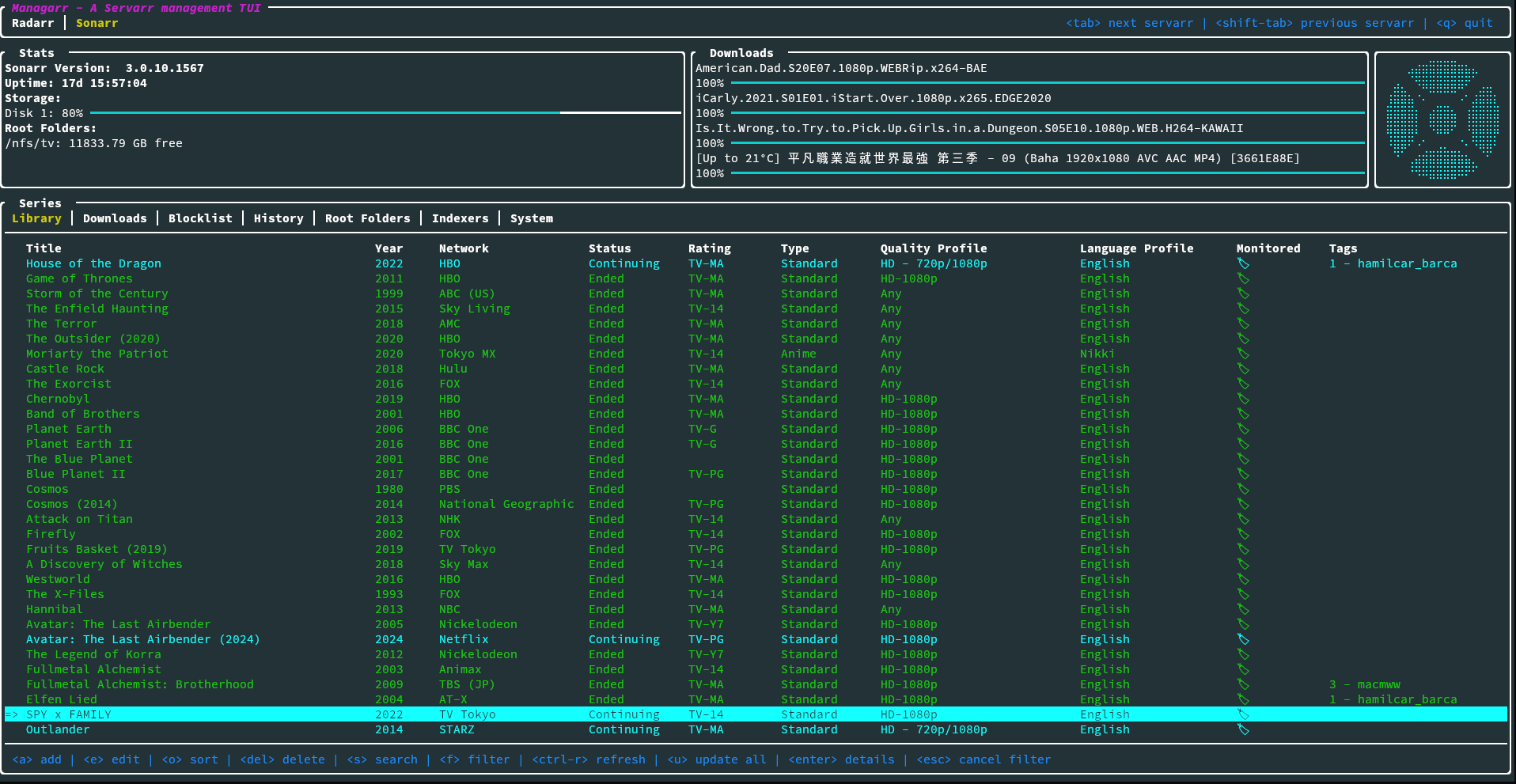
I was recently furloughed from work, so in between job applications, I decided to polish off Sonarr support in my Managarr TUI. Thus, I'm very proud to announce the beta release of Managarr with Sonarr support!

TL;DR: Managarr is a TUI and CLI for managing your Servarr instances. As of now, it now supports both Radarr and Sonarr and all the features that are available in the UI are also available in the CLI for scripting and additional automation.

The new version has the following features:

  • Wider platform support (Windows, Mac, Linux, x86_64 and arm64)
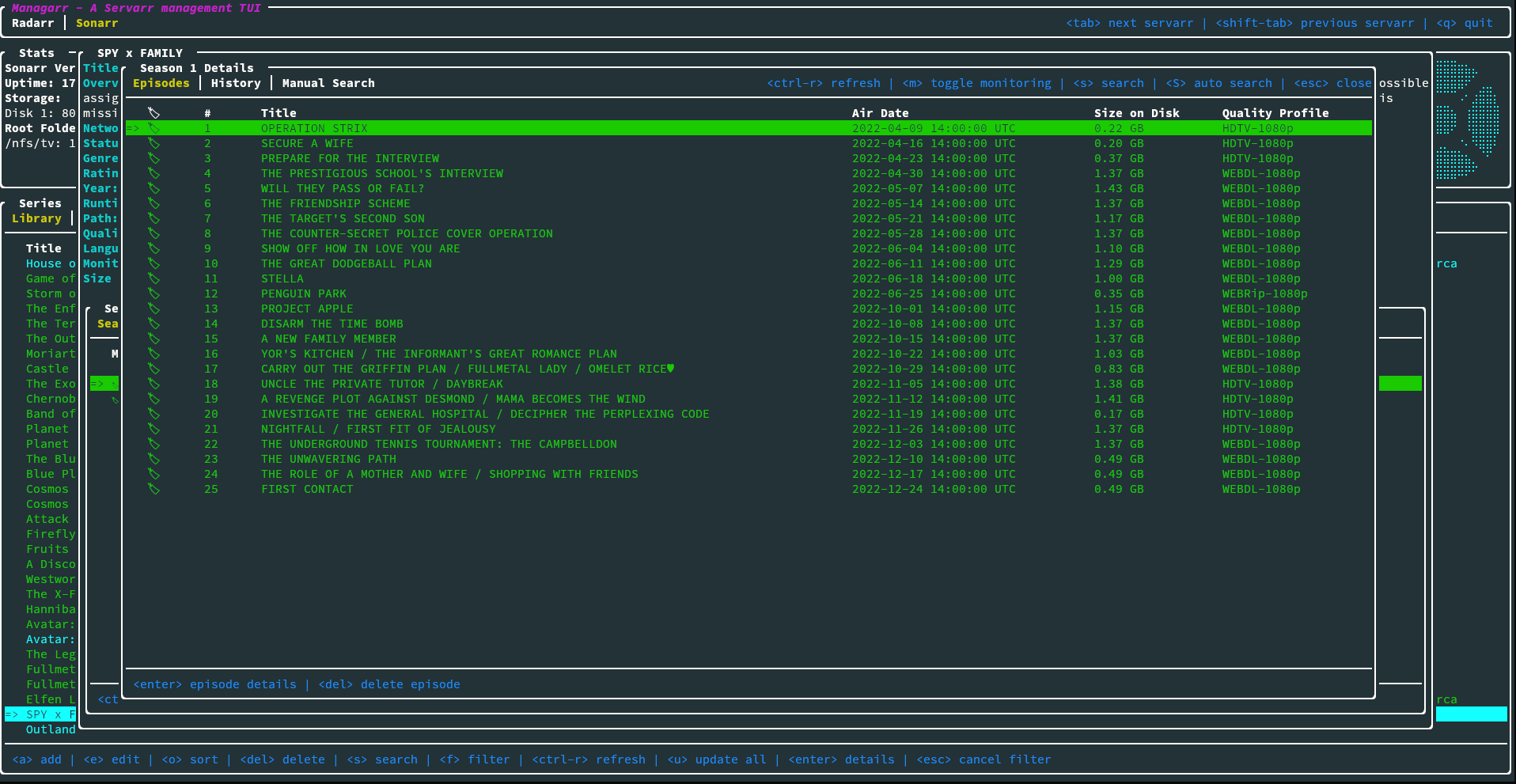
  • View your library, downloads, blocklist, episodes
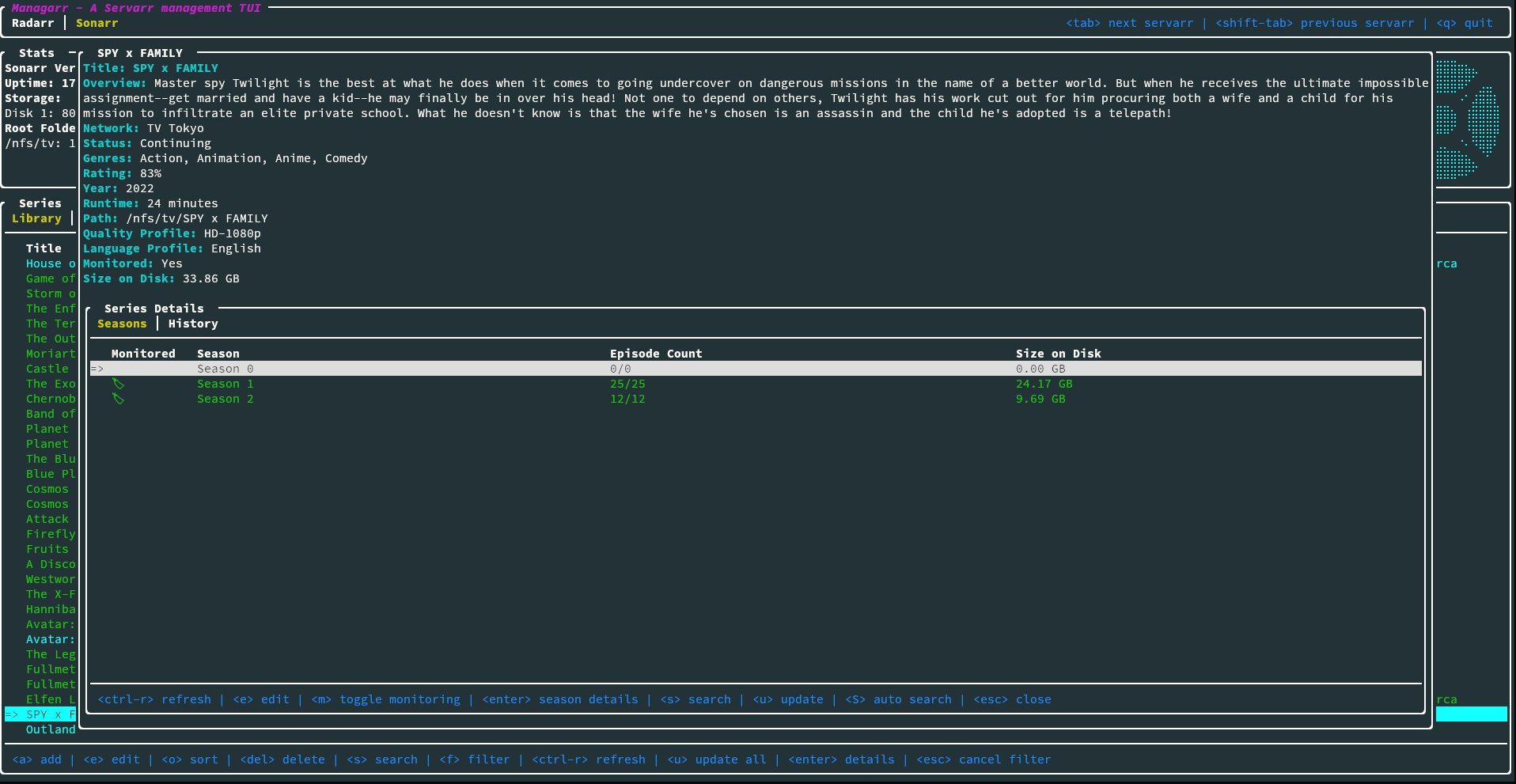
  • View details of a specific series, or episode including description, history, downloaded file info, or the credits
  • View your host and security configs from the CLI to programmatically fetch the API token, among other settings
  • Search your library
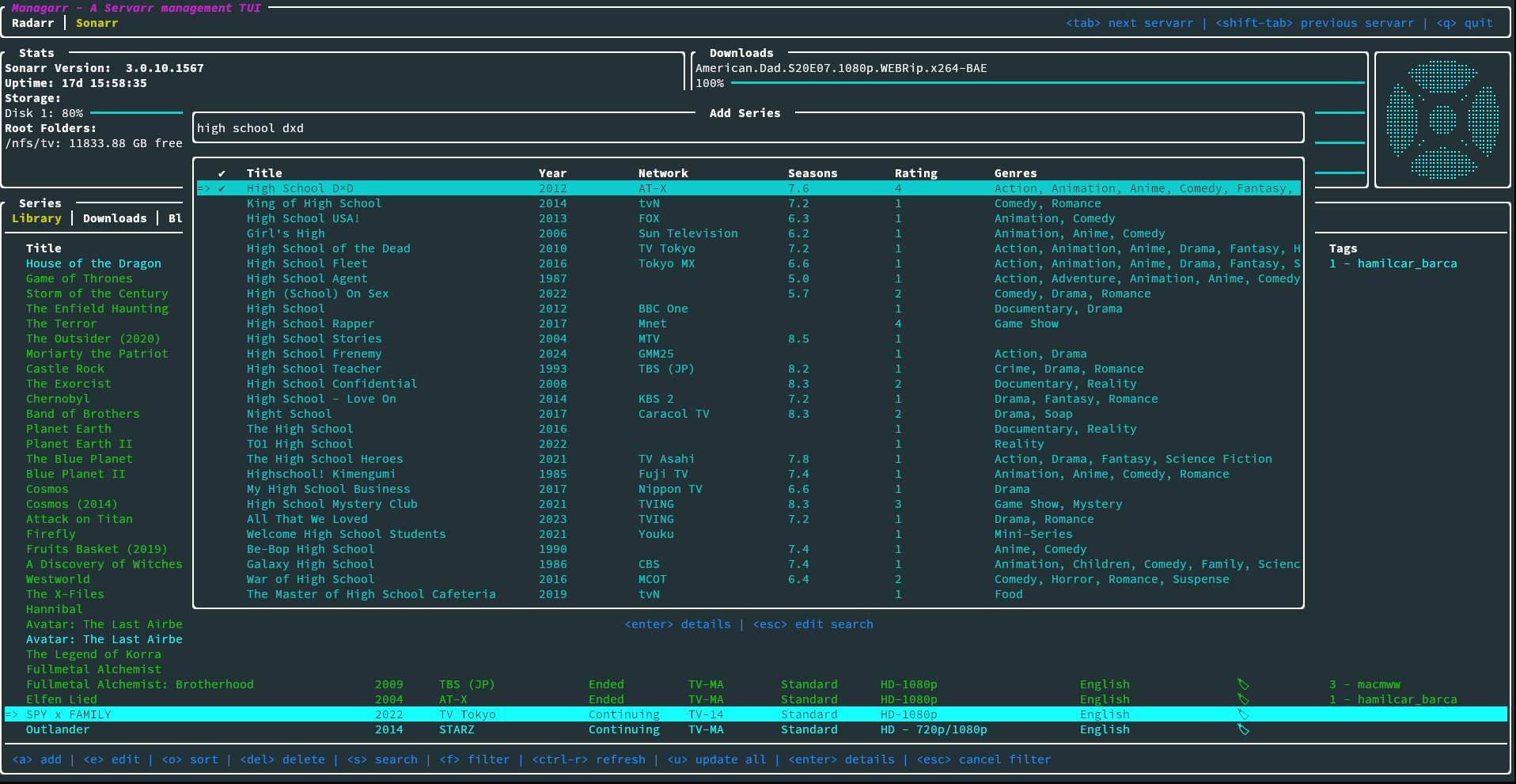
  • Add series to your library
  • Delete series, downloads, indexers, root folders, and episode files
  • Trigger automatic searches for series, seasons, or episodes
  • Trigger refresh and disk scan for series and downloads
  • Manually search for series, seasons, or episodes
  • Edit your series and indexers
  • Manage your tags
  • Manage your root folders
  • Manage your blocklist
  • View and browse logs, tasks, events queues, and updates
  • Manually trigger scheduled tasks
  • Manually trigger scheduled tasks
  • And more!

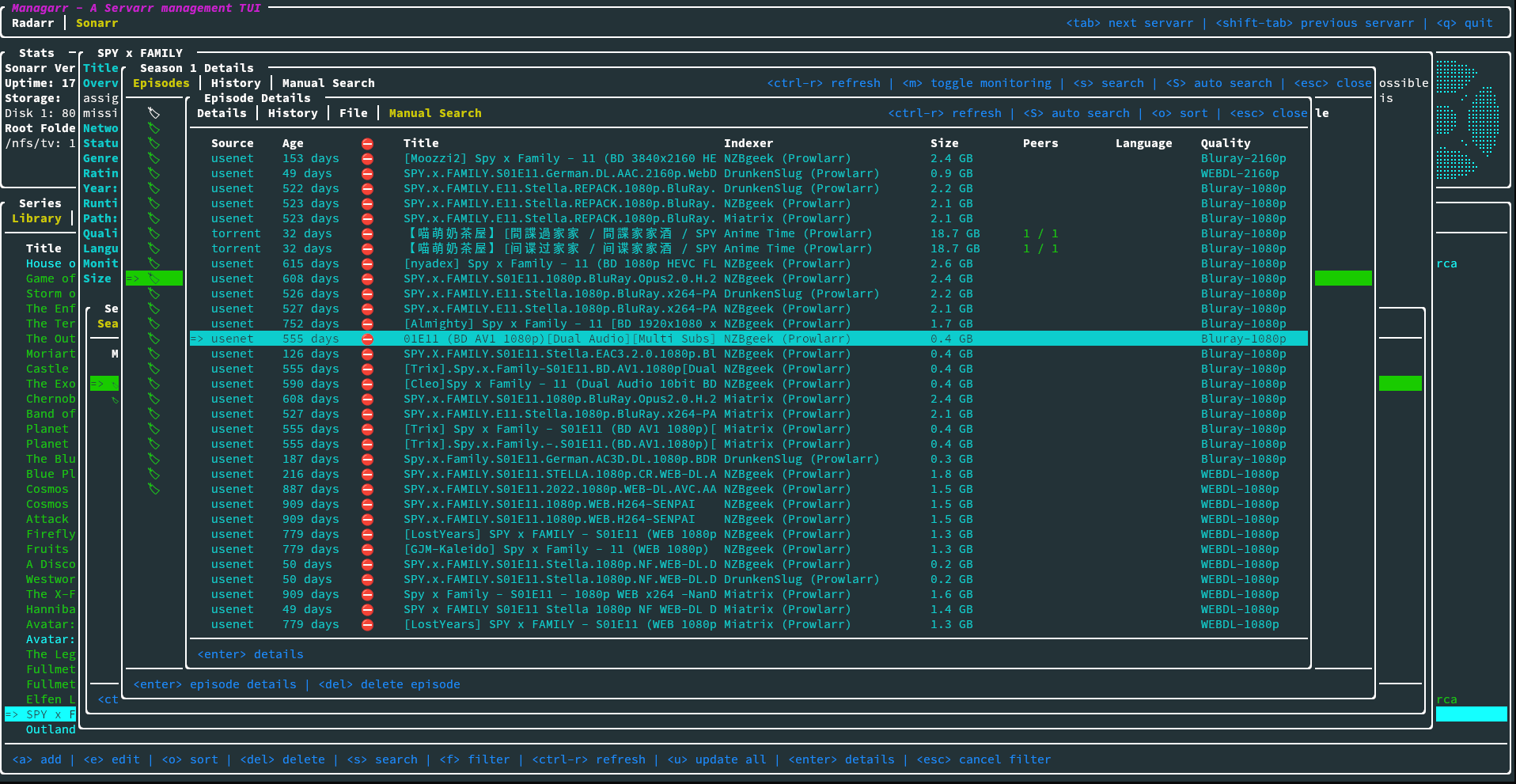
Here's some screenshots of the Sonarr tab:

Thanks to everyone's feedback when I first posted the alpha release here, this version sports a handful of additional performance improvements and platform support.

This is now technically in beta, so if anyone encounters any issues, please let me know!