this post was submitted on 26 Mar 2026
1176 points (99.2% liked)
Lemmy Shitpost
38882 readers
4603 users here now
Welcome to Lemmy Shitpost. Here you can shitpost to your hearts content.
Anything and everything goes. Memes, Jokes, Vents and Banter. Though we still have to comply with lemmy.world instance rules. So behave!
Rules:
1. Be Respectful
Refrain from using harmful language pertaining to a protected characteristic: e.g. race, gender, sexuality, disability or religion.
Refrain from being argumentative when responding or commenting to posts/replies. Personal attacks are not welcome here.
...
2. No Illegal Content
Content that violates the law. Any post/comment found to be in breach of common law will be removed and given to the authorities if required.
That means:
-No promoting violence/threats against any individuals
-No CSA content or Revenge Porn
-No sharing private/personal information (Doxxing)
...
3. No Spam
Posting the same post, no matter the intent is against the rules.
-If you have posted content, please refrain from re-posting said content within this community.
-Do not spam posts with intent to harass, annoy, bully, advertise, scam or harm this community.
-No posting Scams/Advertisements/Phishing Links/IP Grabbers
-No Bots, Bots will be banned from the community.
...
4. No Porn/Explicit
Content
-Do not post explicit content. Lemmy.World is not the instance for NSFW content.
-Do not post Gore or Shock Content.
...
5. No Enciting Harassment,
Brigading, Doxxing or Witch Hunts
-Do not Brigade other Communities
-No calls to action against other communities/users within Lemmy or outside of Lemmy.
-No Witch Hunts against users/communities.
-No content that harasses members within or outside of the community.
...
6. NSFW should be behind NSFW tags.
-Content that is NSFW should be behind NSFW tags.
-Content that might be distressing should be kept behind NSFW tags.
...
If you see content that is a breach of the rules, please flag and report the comment and a moderator will take action where they can.
Also check out:
Partnered Communities:
1.Memes
10.LinuxMemes (Linux themed memes)
Reach out to
All communities included on the sidebar are to be made in compliance with the instance rules. Striker
founded 2 years ago
MODERATORS
you are viewing a single comment's thread
view the rest of the comments
view the rest of the comments
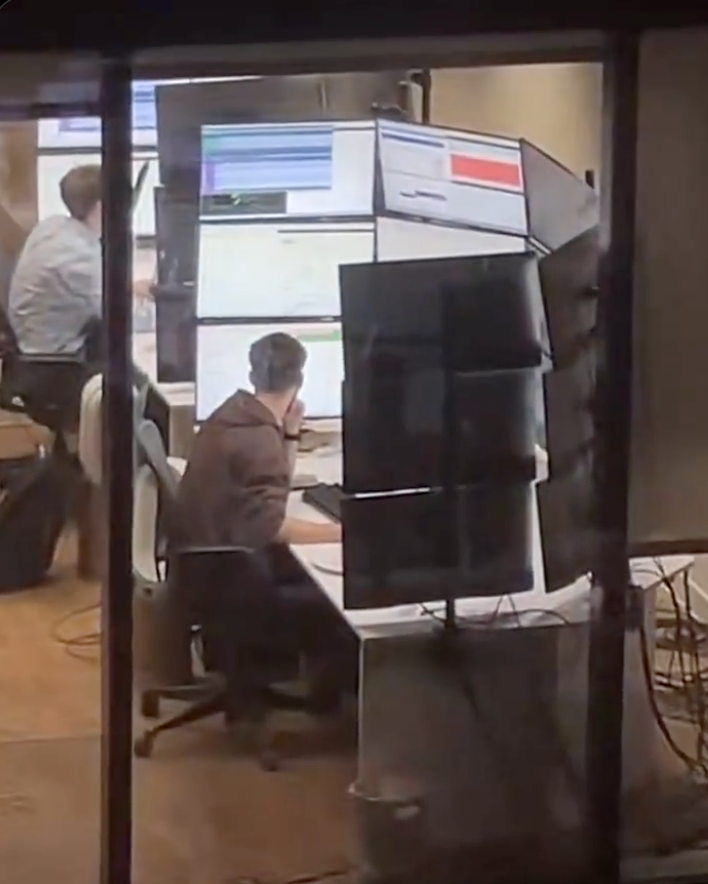
Wtf is this ? What the hell are they doing that requires 15 screens ?
Reminds me of the workstation from ~~"Halle Berry's Breasts: The Movie"~~ Swordfish.
I think they're great the way they are but maybe somebody will remake Total Recall again with her as Mary.
~~“Halle Berry in a Bikini: The Younglings Awakening - A Kids Movie”~~ The Flintstones
Despite the movie itself sucking, that's a rad looking setup. I mean, it would suck to use for actual work, but its cool as hell.
🤢
What aren’t they doing?
IDK but I've seen pics of 911 operator setups with some absurd number of screens and I bet there's a lot of stuff that would be useful for them to have open.
Makes sense yeah. I guess at this point it's a monitoring station more than a computer, i.e the operator is not gonna have many interactions with it other than looking at the screens
My parents were 911 dispatchers for decades. It's how they met. They had 7 monitors last time I visited them at work 20 years ago. Their applications seemed to be built on the idea they had multiple monitors worth of space that they'd be stretched across.
If I remember accurately, there were 2 computers (and thus 2 mice and 2 keyboards). The first computer had 5 monitors and was the Google Maps equivalent for where all the active ambulances in the city were. The main application stretched across multiple monitors and had sub-windows with different operations in them. I think it also managed the radio between dispatcher and ambulance. The second computer was dedicated to the phone, the caller, any history attached to the phone number, and all the data 911 gets about your location. It took up the remaining few monitors. By now it's probably 1 computer and even more monitors.
Separate computers may be due to necessity. For example, one of the systems they need may have a provided computer to handle it that is managed and supported by that vendor on a separated network for security.
Yeah, but not that many.
Usual setup nowadays: One monitor for the main CAD (computer aided dispatch) forms, one for map overview, eventually a third one for a unit overview(theye are often done on the map monitor these days), one for external data (browser window, video feeds,etc.), one below as a touchscreen for communication control (VoIP/Radio).
Most EMS Dispatch clients I have switched to a three+one touch setup ages by now and rather use a central dashboard for some less important views and feeds.
It's 4. My daughter is an operator.
I have a friend who works for Transpower (company in charge of NZ electric grid) and occasionally goes into their control rooms. Apparently they have set ups like this. It gets worse, because there are several computers hooked up to the different monitors, so not only do they have a wall of monitors, they have a bunch of different keyboards and mice (mouses?) that they have to hunt through if they want to actually interact with something
They need to invest in some KVM switches. Just leave the monitors connected directly to the towers but route the input devices through the switch. There's no good reason for a single person to face more than one keyboard and mouse at the same desk.
There's plenty of good reasons. Redundancy, simplicity, speed, physical context switching...
Redundancy for a keyboard and mouse? Keep an extra set in the drawer or something. No need to have them all out and connected. Simplicity? How is it simpler to have multiple input devices littered about than one set? You can't really physically use multiple at once. Speed? Speed of what? Of input? The latency on a KVM is negligible, particularly for an IO device? Speed of swapping? With multiple keyboards and mice, you have up manually move around devices and/or your body. With a KVM, you press a button. How is that slower?
Physical context switching is the only thing I'll grant you, but I don't see how that's such a benefit compared to the hassle, clutter, and hectic work flow when you can just use a KVM.
We're probably thinking about very different work environments.
Redundancy is more about not having a single point of failure. If you have a need for a redundant system, having a single point of failure in the KVM means you no longer have cc a redundant system.
For me, I find it simpler having a dedicated keyboard and mouse per computer, mainly to avoid the mad wiggle of the mouse to find the cursor, and then wiggle again because you found the cursor but it's not moving, has it crashed? Oh that's right, I'm using a KVM, and I'm controlling the computer that's over there. With dedicated keyboard and mouse, it's always obvious which machine I'll be controlling. And yeah, I meant slower to switch. You need to move your hand off the keyboard to press the button, then move your hands back, usually having a slightly awkward pause when it takes a moment to register the switch. With dedicated keyboards, you move your hands once, done.
And I can think of plenty of scenarios where you want to do an action at the same time on two machines. Want to compare two copies of a document across the two machines? Left hand on page down for one machine, right on the other. Trying to test a bug that mucks up the timing of a jump in a game on one system but not the other? Spacebar at the same time. Going through the same install process simultaneously on 4 machines? It either takes four key presses on different keyboards to select an option, or four key presses and four KVM button presses.
For a lot of stuff, KVM is the way to go, especially if you tend to just do a bunch of stuff on one machine, then do a bunch of stuff on another. For a lot of situations though, such as if you're having to only do occasional stuff, or doing lots of small things on different machines, it's not the way to go.
I did not expect to be writing such a detailed essay on such a trivial thing today, so thanks for coming to my TED talk!
One of the operator pulpits at my work can be run by one pulpit operator, but commonly has multiple people in it - someone is almost always being trained, floor operators hang out on break or when maintenance has to take the machine for a while, lead operators and supervisors and quality personnel stop in to monitor. They have I think five computers, all with their own keyboard and mouse. The operator mainly interacts with just one, and the others are set up for reference spread all around the edges of this room that comfortably holds five people. It works pretty well because the auxiliary people can look stuff up on the reference computers without having to take away keyboard or mouse control from the operator, and with how physically distant some of the machines are from each other, a switched keyboard would have to get carried around the room which would be annoying.
Sure but that is entirely different than having all of those monitors at the same single desk with multiple input devices only accessible by the one person at that desk.
Reminds me of VirtualBox on Wayland. It won't correctly capture the mouse, so it just exits and re-enters the window in random positions. Say, on guest you see it in middle left, you move it a bit to the right, and it jumps out of bottom right corner.
So, time to have a second mouse, and do USB passthrough.
But also UEFI on my HP mini PC doesn't work with every keyboard, so a second keyboard for UEFI.
Kiwi gang!
There's ~~dozens~~ at least three of us!
Soon to be ~~four~~ three and a half
I want to join, but they don't let me
There is crossplatform software for mouse/keyboard sharing.
I work in ATC and we have several desks with around 12 to 18 screens. Not in that layout tho, but on a much larger banana form.
They are used at different support positions so not ATC radars. Mostly for monitoring but also used with keyboard and mouse.
The applications goes from technical surveillance of ops systems, to flow capacity (airspace capacity), meteo broadcast for all airports (ATIS) or ground-ground telecommunications of aeronautical data.
It's the boss screen, in a second they will Alt-Tab into Flight simulator.
It’s a cropped version of a BBC office someone could see from their apartment
I remember that post, and that only makes it stranger. What is the BBC doing that requires that many monitors?
Gooning
I've seen stock traders where everyone on the floor had half that many. A few of them had 9.
When they're looking up trades or news, they open a ridiculous number of windows while doing research.
They have 4 screens just to watch the markets and handle in-house controls.
What's striking about this is the amount of whitespace on the screens. They are only using 1/2 - 1/4 of their screen space.
Traders love doing this
IIRC when keemstar posted it, it's a BBC office
Not sure about this one, but I know quant traders sometimes like many screens with many dashboards for realtime trading.
Russian space program