
Well I use,
- META+E: Files
- CTRL+SHIFT+ESC: System Monitor
- META+I: Settings
- ALT+TAB: Switch Windows
Hint: :q!
Sister communities:
Community rules (click to expand)
1. Follow the site-wide rules
sudo in Windows.Please report posts and comments that break these rules!
Important: never execute code or follow advice that you don't understand or can't verify, especially here. The word of the day is credibility. This is a meme community -- even the most helpful comments might just be shitposts that can damage your system. Be aware, be smart, don't remove France.
Well I use,
They paid millions in user trails and data to get there and then did windows 8
Ah when I got my android phone as a kid copied the newest iPhone with it to show you didn't need to pay all that for the same experience. Transitionary times are fun
But many Linux DEs are made to be similar to Windows anyway. They are serving generally the same purpose of supporting the file/app world. It's about time we moved on to a more streamlined user friendly world. But people's lack of imagination holds us back.
I tweaked my KDE desktop to look like XFCE.
What does that make me?
KDFCE boy :)
But at least it's windows XP, right?
I tweaked to look like windows xp, loved the retro feeling
I made my KDE desktop look like Windows 7 and I like it
What's wrong with wanting a UI you're used to?
Everyone wants other people to switch to Linux until they do literally anything a purist wouldn't do with their own personal setup 😅
Windows is a fine operating system. The NT kernel is pretty good, all things considered, and the design and UX of XP, Vista, and 7 were overall pretty peak. The main problem with Windows is and always has been Microsoft. Expose theme 4 lyfe.
Windows NT kernel is a disaster itself. Inferior on all parts when comparing to FreeBSD or Linux kernels.
I use Windows from Scratch. I built all the bloatware and telemtry myself, god damn it!
Always nice to come across fellow React developers!
Aha ! I choose a distro that looked like Windows out of the box, so did not tweak anything, joke's on you i'm no psycho
I like making mine look like "XP if I got to make it do what I want and have things like dark mode."
I just miss the era :)
How does it look?
Having grown up with a Mac before OS X came out, I liked that I could make XFCE look a bit more like OS 9, but I haven't been able to find a suitable equivalent for kde yet.
I might give a Windows 7 theme a try. As much as I hate Microsoft, I've been feeling unusually nostalgic for 7. That one was kind of peak for gaming.
only for gaming compatibility
Well, first I tweak my windows to mimic the appearance of the windows that I liked, windows 7. Then I tweak my Linux to mimic that.
Just because hurr durr windows bad, doesn't mean their huge team of UI and UX designers didn't ever come up with a good design. And like most things Microsoft, I take pleasure in pirating it when I can.
Goddamn it I still miss 7
IMO, Windows's UI/UX might seem good only if you haven't tried anything actually different. Tiling/scrolling WMs is the way.
I'm pretty much always picking XFCE or KDE over just a WM. In the case of KDE, I use it like Windows. I make XFCE as Unity-like as possible, which I believe is the best interface for limited screen real estate.
I'm using the term "WM" loosely, as a more of a general term here.
And no, i can't call a DE that adds a title bar to every window, has a huge-ass taskbar, and a limited amount of free space per workspace "best for limited screen real estate". Something like Niri, MangoWC or Hyprland (with scrolling layout enabled) works much better and cleaner precisely in that regard, since they offer
a) a hotkey-first UX, meaning that everything usually represented by a UI button is moved to the keyboard and no longer needs to clutter the screen
b) literally infinite horizontal space.
I literally can't go back ever since i gave tiling a try, any floating de/wm now feels clunky and awkward to me.
I use KDE on my desktop because I don't care about maximizing screen real estate in that context. I have a large monitor, so I can afford to lose some pixels to my taskbar or window borders. That being said, if I did care, I can make the taskbar autohide and pick a slim/minimal theme for the window borders. With regard to XFCE, I said I make it Unity-like. As such, there is no taskbar. I have a slim panel at the top that shows stuff I want to be able to see easily (i.e., pinned background applications, battery life, date, time, etc.) My dock-like panel autohides, so it takes up no real estate. Maximized windows merge into the top panel like in Unity, so the window borders take up no extra room.
Any DE can become "hotkey-first." For example, I launch terminal with CTRL+ALT+T. My application launcher is CTRL+SPACE, and it is text-based. Most DEs have default hotkeys for a lot of functions, and they are customizable.
Of course, all of this comes down to how one's workflow is. I don't ever see myself wanting to scroll my desktop or deal with windows auto-tiling. Multiple desktops is another example. It's something just about every DE offers, but I've never had a use for it. Different strokes for different folks.
There's nothing wrong with tuning your UI to match one you're more comfortable with. Thats the beauty of Linux.
I used to do this, and it meant I'd hold onto old habits and never used my current OS how it was intended.
This wasnt just for Linux either, I'd try using Win95 like 3.1, I'd try using XP like 98, I'd try using win 8 like 7, I'd try using OS X like Windows and I'd try using Linux like OS X or like Windows.
When I decided to learn the OS I was using (which didn't take much effort, but was a bit of a conscious decision) I had a much better time, less frustrated and more comfortable.
That would always be my recommendation to anyone switching OS (Or DE) learn it the way it was intended and you'll have a much better time
I wish I could tweak Win 11 to look like Win 7. The only improvement since then was putting the Folder Up button back and adding tabs to Explorer, everything else is worse.
Exact same. That missing up button alone made me not like Windows 7, I didn't realize how much I relied on it in xp. I have one pc that I keep Windows 11 on for work because there's just too much niche software I need that only supports Windows, but everything else is Linux at this point.
Well yes, but i always tweeked my windows to the point of breaking. Now i use mint and have reached the point where i love how it looks, everything works and i will likley sit with its current form for some years, maybe untill my kids are older and i have more time to waste again.
I tweaked my NIRI WM to look like KDE
Windows 8.. or Windows 11 😬
There is a scale of psychopathy...
XP, though? Hell yeah. I still miss that theme.
The Media Center theme was a nice twist on the default XP theme I'll admit.
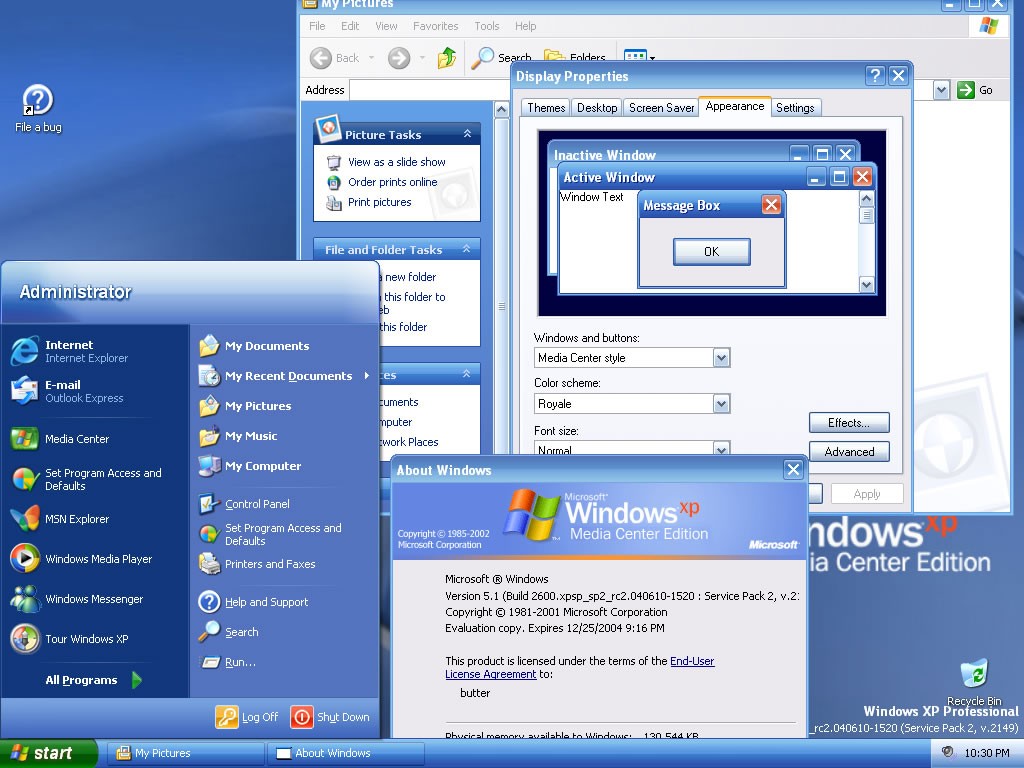
I used Royale Blue for ages, it was super easy to find the installer for and was signed by M$ so needed no UXTheme patch.
There was also Royale Noir and Royale Zune. Noir is a dark theme (Not to be confused with dark mode) and Zune, which was a different shade of black and sported an orange start button. Lastly there was also Royale Embedded which was a darker shade of blue, and had a blue Start button.
I tweak my linux so it becomes a prison for anyone that boots that isn't me, we are not the same.
If someone that isn't me can competently use my computer I consider it a personal failing. Always open to tips
Reminds me of this youtuber that fell for a scammer's bait intentionally except he was in a VM of hannah montana linux. The scammer was so fucking confused haha
Got a link?
I do this, but largely around customizable tiling, keyboard shortcuts, low to no animations, and RDP.
As far as actual -theme- that seems insane.